

Update 14 November 2026: Microsoft has now named the cause of the outage: a technical issue, not a cyberattack and not caused by AI agents. The full Post-Incident Report is still pending.
Key points
- Since Thursday evening, 12 November 2026, Microsoft 365 has been disrupted worldwide. Outlook and Exchange Online are hit hardest, along with parts of Teams, SharePoint, Copilot, Defender, Intune and other services.
- Microsoft opened the incident at 17:17 Swiss time. By around 19:00, Downdetector had logged nearly 130,000 Outlook reports from 74 countries. Hundreds of reports also came in from Switzerland.
- According to Microsoft, servers failed automated health checks; later, an overwhelmed process that establishes secure connections was identified as the bottleneck. Microsoft says there is no sign of malicious activity.
- According to Microsoft's final status, it was a technical issue following an earlier network capacity upgrade and a recent network change, not a cyberattack. The full Post-Incident Report is still pending; we will update this article once it is out.
- For SMEs, the outage shows one thing above all: if email, phone, calendar and sign-in all depend on one provider, you need a plan B. Our checklist shows what to have ready.
As of Saturday, 14 November 2026. Microsoft has named the cause in its final status; the detailed Post-Incident Report is still pending.
Anyone trying to answer one last email on Thursday evening saw nothing but an error message or an endlessly spinning wheel in Outlook. The Microsoft outage started in the US and spread around the globe within an hour. On Friday morning, users in Switzerland were still reporting sign-in problems, and it was only around 10:00 that Microsoft spoke of «early signs of stabilization».
Here is what is confirmed so far, who the Microsoft 365 outage hit, and what Swiss SMEs should take from it before the next one.
What happened? How the outage unfolded
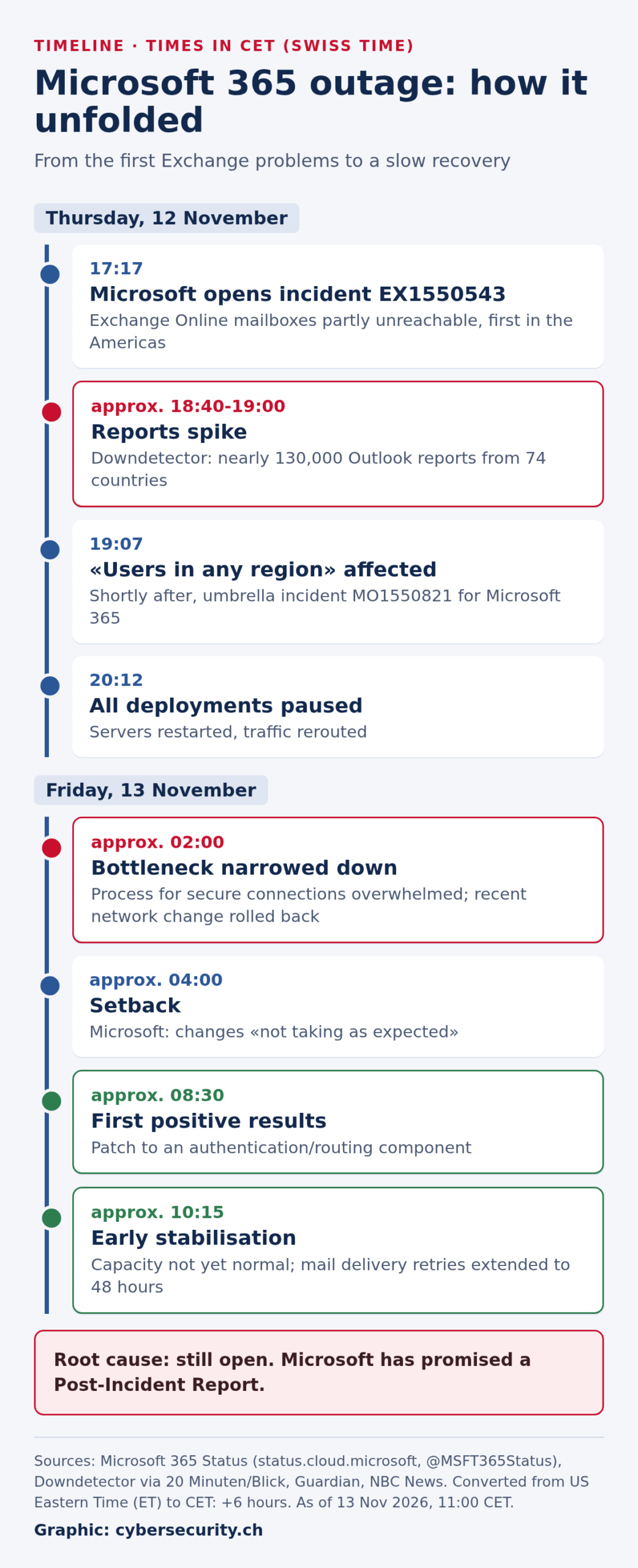
Based on Microsoft's status page and its @MSFT365Status account on X, the outage unfolded as follows (all times Swiss time, CET):
- Thursday, 17:17: Microsoft opens incident EX1550543. Users cannot reach their Exchange Online mailboxes through several connection methods. Initially, the problems are described as affecting the Americas.
- From about 18:40: Reports on Downdetector spike. By around 19:00, 20 Minuten counts nearly 130,000 reports for Outlook alone. The NZZ cites a peak of almost 140,000, more than 2,000 times the usual level.
- 19:07: Microsoft says users «in any region» may be affected. Shortly after, it opens the umbrella incident MO1550821 for Microsoft 365.
- 20:12: Microsoft pauses all deployments, reroutes traffic and restarts affected servers.
- Friday, around 02:00: Microsoft narrows down the bottleneck: a process on the affected servers that establishes secure connections becomes overwhelmed. In parallel, it rolls back a recent network change that coincides with the start of the outage.
- Around 04:00: Setback. The changes are «not taking as expected».
- Around 08:30: A patch to an authentication and routing component shows «positive results» for server stability, according to Microsoft.
- Around 10:15: Microsoft reports early stabilisation, but capacity is not yet back to normal. To keep delayed mail from being lost, it extends the delivery retry window to 48 hours.
Which services are affected?
At the centre is Exchange Online, the service behind business Outlook mailboxes. According to Microsoft, users may be unable to open their mailbox in Outlook on the web, the desktop app or on mobile, and email delivery may be delayed. Everything that depends on Exchange is affected too:
- Outlook and Exchange Online: no mailbox access, delayed delivery. Mail already cached locally can often still be read.
- Microsoft Teams: chats, calls and meetings largely keep working. Calendar, invitations and scheduling fail.
- SharePoint and OneDrive: files stored directly remain accessible according to Microsoft; features tied to Exchange and, in some cases, external sharing do not.
- Copilot, Planner, To Do, Power BI, Universal Print: partly unusable.
- Security and administration: Microsoft Defender, Defender for Office 365 (such as Safe Links and quarantine), Intune, Purview and parts of the admin center are impaired.
- Consumers: Outlook.com, OneDrive and Teams for personal use are affected too.
According to ABC News Australia, the Authenticator app, which many companies use for two-factor sign-in, was also down at times. Those who rely on it were in some cases locked out of their systems altogether.
What Microsoft says about the cause
Microsoft's explanation changed several times overnight, which is normal for a live incident. At first it spoke of «elevated load» in several regions. An hour later it clarified that more traffic was not the problem: a number of servers had unexpectedly gone offline because they failed automated health checks. The remaining servers had to carry their load and buckled as well.
Overnight, Microsoft pointed to a process on the servers that establishes secure connections and becomes overwhelmed. It is also examining a recent network change that coincides with the start of the outage. In its final status, Microsoft later named a problem during an earlier network capacity upgrade as the trigger, which surfaced after the network change.
What is clear: Microsoft says there is no indication of an attack. Copilot chief Charles Lamanna confirmed this on X, and after speaking with Microsoft, Australian Home Affairs Minister Tony Burke compared the case to the 2024 CrowdStrike outage, when a faulty update took down systems worldwide.
Update: root cause
In its final status for the incident (as of early Saturday, 14 November 2026), Microsoft named the cause: a technical issue unrelated to a cyberattack or AI agents. The incident was introduced by a problem during an earlier network capacity upgrade that surfaced after a recent network change. Microsoft says it has addressed the underlying issue and, given the scale of demand, restored services gradually, validating stability at each stage. This took longer but was meant to ensure a stable recovery.
This fits the earlier interim updates: servers dropped out, an overloaded process that establishes secure connections became the bottleneck, and a recently deployed network change was rolled back. Microsoft has not yet published the full Post-Incident Report with details and countermeasures. We will add it here as soon as it is out.
Impact worldwide and in Switzerland
According to Microsoft, more than 430 million people use Microsoft 365 apps, so the impact was broad. In the UK, several police forces asked people to report crimes by phone rather than online, schools switched to phone, and an NHS provider reported email disruption, according to The Guardian. In Japan, government spokesman Minoru Kihara said communication between ministries was disrupted (NBC News). The Microsoft connectors of OpenAI's and Anthropic's AI services stopped working as well.
In Switzerland, the outage-reporting site allestörungen.ch logged around 100 Outlook reports on Thursday evening. By 7:30 on Friday, 20 Minuten counted more than 340 for Outlook and more than 185 for Microsoft 365, most of them sign-in problems. Specific effects:
- Richemont: The Geneva-based luxury group could not publish its half-year results at 7:00 on Friday as planned and released them late (cash.ch).
- University of Basel: Its IT services warned that emails were arriving late or not at all and asked staff to use the phone for urgent matters (University of Basel).
- Businesses and public sector: According to the NZZ, many companies, authorities and hospitals are affected alongside private users. Because the outage only began on Thursday evening in Switzerland, damage was limited for many businesses. Friday morning, by contrast, fell in the middle of the working day.
Were airlines affected?
Yes, but mainly customer service rather than flight operations. In India, SpiceJet cancelled three flights from Delhi on Friday morning and delayed two more because of the Microsoft problems, according to NDTV. IndiGo and Akasa Air said their email support was disrupted. Air India rerouted its email and stressed that flight operations were unaffected (Gulf News).
The UK airports Heathrow, Manchester and Stansted told the BBC that operations were normal. As of Friday midday there were no reports of disruption at SWISS or Swiss airports. That is an important difference from the CrowdStrike outage of July 2024: back then a faulty update crashed Windows machines, including check-in systems. This time the outage affects cloud services for email and collaboration, not the operating systems on site.
What to do during the outage
- Check status only via official sources: status.cloud.microsoft and the @MSFT365Status account on X. Microsoft posts there precisely for when the admin center itself won't load.
- Don't resend emails: whatever is stuck in the outbox will go out later. Resending means the recipient gets several copies.
- No new Outlook profile, no reinstall: the problem is on Microsoft's side. A new profile can wipe the local copy of the mailbox you may still be able to read from.
- Try the browser: according to the NZZ, access via office.com in the browser sometimes works sooner than the desktop app.
- Urgent matters by phone: inform customers, suppliers and staff via a second channel, for example with a notice on your website.
Watch out: phishing exploits the outage
Major outages are a gift to scammers. Security firms such as McAfee and Australian banks are already warning of fake messages that claim to help «restore» access. Typical examples are emails or texts linking to a fake Microsoft sign-in page, prompts to download an «update», or calls from supposed IT support staff who want to set up remote access.
Microsoft does not ask for a new password or a verification code by email after an outage. Anyone who did enter credentials on a suspicious page should change the password immediately, have all sessions signed out and inform IT. We have shown how sophisticated phishing against Swiss companies has become with the example of fake emails in the name of the commercial register. Suspicious messages can be reported to the NCSC.
What Swiss SMEs should learn from the Microsoft outage
1. One provider is a concentration risk
Over the past few years, many SMEs have moved everything to Microsoft 365: email, phone via Teams, files, calendar, sign-in. That is convenient and usually more secure than a server in the basement. But it also means that if this one service fails, almost everything stops. That is not an argument against the cloud, but it is a reason to ask honestly: which processes can be down for how long, and what do we do then? Microsoft's contract promises 99.9 percent monthly availability for many services. If that is missed, there are credits on licence fees, and only if the administrator files a claim. They do not cover lost revenue.
2. Emergency communication must not depend on email and Teams
The most obvious lesson, and the one most often missing: how does management reach staff when Outlook and Teams are down? A printed phone list, an SMS chain or a group set up in advance in Threema Work or Signal costs little. What matters is that the channel is agreed beforehand and everyone knows about it. Setting up a group in the middle of an outage tends to work badly.
3. Two-factor sign-in needs a fallback
Two-factor sign-in is right and remains right. But if the Authenticator app does not respond, the door stays shut. It makes sense to have a second sign-in method per person, such as a FIDO2 security key, and two emergency accounts for administration («break-glass» accounts). Microsoft itself recommends such accounts. They are very strongly protected, not used day to day, and any use is monitored.
4. A written, rehearsed plan for Microsoft 365
An emergency plan does not have to be thick. Two pages are enough if they say who detects the outage and decides, who informs customers and staff, which fallback channels exist, where the key contacts are stored offline and which processes take priority. The ICT Minimum Standard, originally developed by the Federal Office for National Economic Supply and now hosted by the NCSC, offers a good free framework, including for companies outside critical infrastructure. If you already have a cyberattack playbook, you can build on it.
5. What the regulations say
A plain outage at the provider is not a cyberattack. The reporting obligation under the Information Security Act (ISG) therefore does not apply as long as no attack is involved. It is a different matter if credentials are phished in the wake of the outage. For banks and insurers, supervision adds to this: with Circular 2023/1 on operational resilience, FINMA requires critical functions to keep running within defined tolerances even during severe disruptions, and with Circular 2018/3 on outsourcing, that material outsourcing arrangements including exit and contingency scenarios are in place. A multi-hour outage of email and calendar is exactly the scenario these plans should cover.
Checklist: emergency plan for a Microsoft 365 outage
During the outage
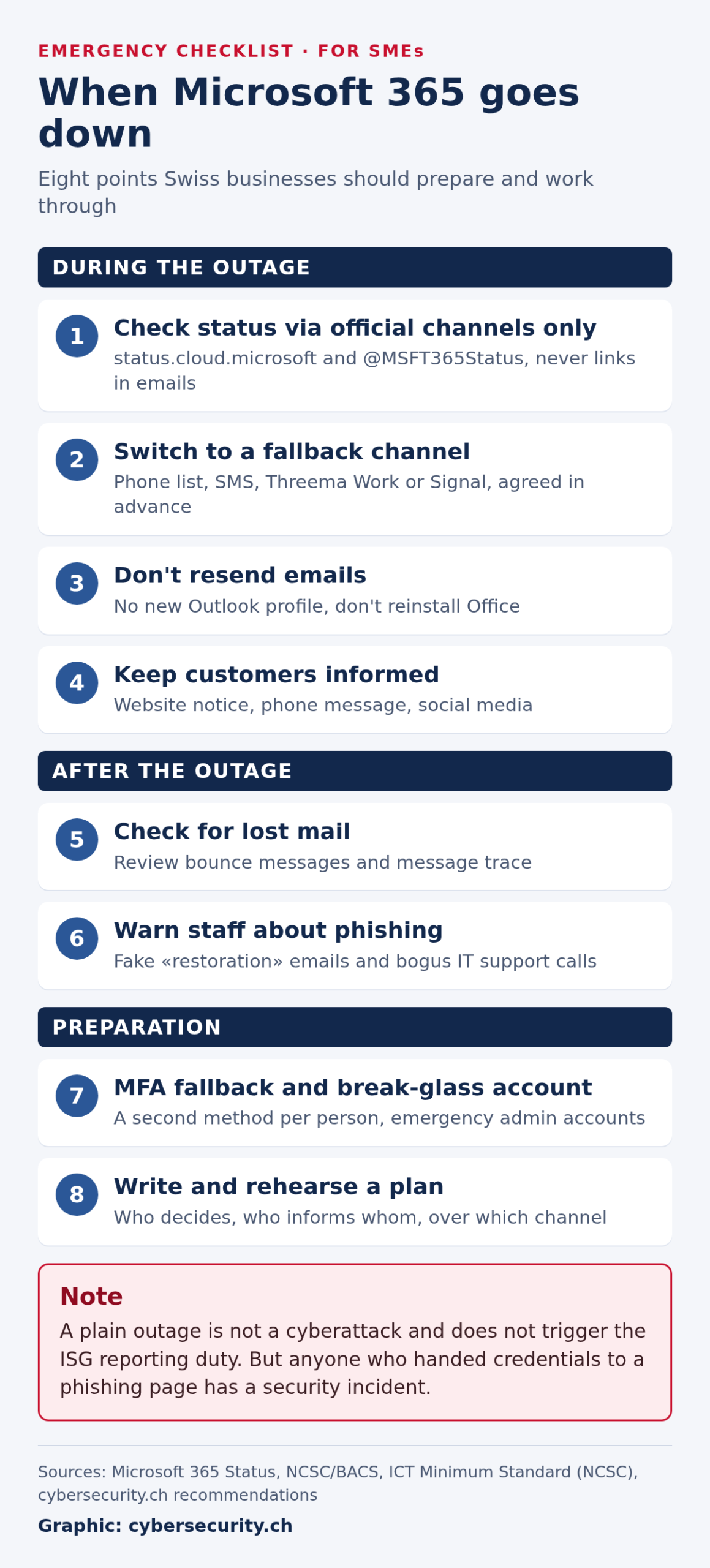
- Check status only via status.cloud.microsoft and @MSFT365Status; do not click links in emails.
- Activate the fallback channel agreed in advance: phone list, SMS, Threema Work or Signal.
- Don't resend emails, don't create a new Outlook profile, don't reinstall Office.
- Inform customers and partners via your website, phone message or social media.
After the outage
- Check bounce messages and, where available, message trace in the Exchange admin center. Ask important senders whether their emails arrived.
- Warn staff about phishing that refers to the outage.
Preparing for the next outage
- Set up a second sign-in method per person and create two break-glass accounts for administration.
- Write down the emergency plan, store key contacts offline and rehearse it once a year.
Our assessment
The Microsoft outage is no reason to panic and no reason to leave the cloud. For most SMEs, running their own mail server would not be a more reliable alternative. But the outage is a good reminder that availability cannot simply be bought. Those who know their dependency, have a second communication channel and secure their sign-in will get through the next outage with a few hours of annoyance instead of a day of standstill. That preparation can be done now, with little effort, while the memory is fresh.
We are following the outage and will update this article as soon as Microsoft discloses the cause.
Sources
- Microsoft: Service Health Status, entries of 12 and 13 November 2026, and @MSFT365Status on X
- 20 Minuten: Microsoft-Störung: Outlook und 365 in 74 Ländern gestört - Behebung hakt, 13 November 2026 (German)
- NZZ: Microsoft meldet massive Störungen: die wichtigsten Fragen und Antworten, 13 November 2026 (German)
- SRF: Ausfälle von Microsoft bremsen Firmen und Behörden weltweit, 13 November 2026 (German)
- Netzwoche: Microsoft kämpft mit Ausfällen von Outlook und Teams, 13 November 2026 (German)
- cash.ch: Richemont-Ergebnisse verzögern sich wegen Microsoft-Ausfall, 13 November 2026 (German)
- University of Basel, IT Services: Störung bei Microsoft 365 (German)
- The Guardian: Microsoft scrambles to fix global outage affecting Teams and Outlook, 13 November 2026
- NBC News: Live updates: Microsoft scrambles to fix major outage, 13 November 2026
- NDTV: Microsoft Outage Hits Airline Ops In Delhi, 13 November 2026
- Gulf News: Indian airlines face disruption amid global Microsoft Outlook outage, 13 November 2026
- BBC News: Microsoft outage live updates, 13 November 2026
- ABC News Australia: How the global Microsoft Outlook outage affects Australians, 13 November 2026
- McAfee: Microsoft Outage Today: Outlook Down & Scams to Watch
- NCSC: ICT Minimum Standard
Stay informed
New analysis on cybersecurity in Switzerland, straight to your inbox. No spam, unsubscribe anytime.
